
FREE DOWNLOAD – CRACKED – MULTI LINKS
TITLE: The Adventures of Elliot: The Millennium Tales
DEVELOPER: Square Enix, Claytechworks
PUBLISHER: Square Enix
RELEASE DATE: 18 Jun, 2026
GENRE: Action, Adventure, RPG
FILE SIZE: 15.5 GB (File Compressed)
If you like this game, BUY IT to support the software developers!
• https://store.steampowered.com/app/3483510/The_Adventures_of_Elliot_The_Millennium_Tales/
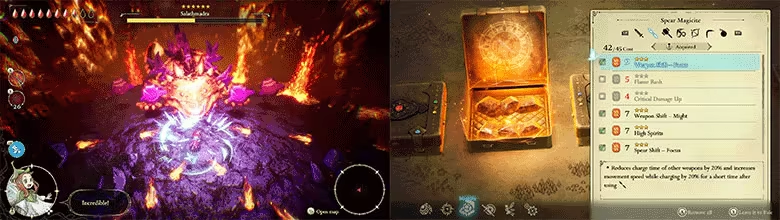
A brand-new action RPG from the creators of OCTOPATH TRAVELER and BRAVELY DEFAULT – The Adventures of Elliot: The Millennium Tales combines stunning HD-2D visuals and exciting action-adventure gameplay for the first time!
The adventurer Elliot and his fairy sidekick Faie set off on a journey across four ages to fulfill a thousand-year mission.
Enjoy intuitive and rewarding action-based battles with strategic support abilities from a fairy as you reveal this world’s mysterious history.
• Seven Weapon Types and Fairy Magic
Arm yourself with up to two weapons at a time to do battle with the beast tribes that overrun the continent. Faie’s fairy magic will prove handy in clearing both the fiends and puzzles that stand in your way.
• The Four Ages of a Millennium
To lift the curse on Princess Heuria of Huther, Elliot and Faie will cross through the Doorway of Time to visit different periods in history.
Elliot’s home time, the Age of Safekeeping…
The Age of Reconstruction, in which humans eke out a meager existence…
Humanity’s height of prosperity in the Age of Magic…
And the Age of Budding, the birth of human civilization.
Across every age, a terrible threat looms over Elliot and Faie’s adventure.
• Personalized Adventuring with Magicite
Customize Elliot’s weapons by equipping different combinations of magicite found during the journey. Try out all sorts of variations and confront obstacles using your own methods.


• ElAmigos release. 8 DLC are included.
• Release is using Hypervisor bypass by DenuvOwO team. Instructions:
– install game
– educate yourself first by reading _Info.txt and DenuvOwO.nfo; CPU virtualization must be enabled in BIOS (some motherboards have it enabled as default setting)
– start as Administrator “VBS.cmd” from game folder, press 1, restart computer, then on the next boot press F7 when new window will show up (driver signature OFF)
– start from desktop icon
• Once you make it work, any other game with Hypervisor can be installed and played from desktop icon (as long as you don’t restart/shutdown PC – then again VBS.cmd > 1 > reboot > F7 > desktop icon)
• Languages: English, French, Italian, German, Spanish, Japanese, Korean, Chinese Simplified, Chinese Traditional
Filecrypt:
Keeplinks:
Admin Note: Turn Off Your Antivirus Before Installing Any Game
1. Download & Extract release (WinRAR or 7zip)
2. Burn or mount the .iso (UltraISO or Daemon)
3. Run setup.exe and install
4. Play the game!
General Notes:
You should follow these steps to avoid encountering errors during the installation and running the game
• Block the game’s exe/the game folder in your Windows Firewall to prevent the game from trying to go online
• Add the game installation folder and also your Windows temporary folder to the Antivirus exclusions section.
• Check if you have enough space for installation
• Run the installer as admin
• Install in another HDD or Drive (& Not Drive C)
• Do not install the game in a folder or drive with non-english characters or symbols too. (Better with short folder name & not in subfolders)
• Install the following packages (Complete Visual C Redistributable, Direct X & SDK): https://gamepcfull.com/software-essentials/
• Install the game in Safe Mode. https://support.microsoft.com/en-us/help/12376/windows-10-start-your-pc-in-safe-mode
• Turn off UAC in Windows
• Install with Windows 7 Compatibility mode
• Increase Windows PAGE FILE Size
• For ElAmigos and FitGirl’s repacks, If you have 8GB RAM or less , Check the 2GB limit RAM usage of setup
Minimum:
Requires a 64-bit processor and operating system
OS: Windows® 11
Processor: AMD Ryzen™ 3 3100 / Intel® Core™ i3-8100
Memory: 16 GB RAM
Graphics: AMD Radeon™ RX 5500 XT / Intel® Arc™ A580 / NVIDIA® GeForce® GTX 1650
DirectX: Version 12
Storage: 20 GB available space
Additional Notes: 1280×720, Graphics Preset “Low”, 60FPS
Recommended:
Requires a 64-bit processor and operating system
OS: Windows® 11
Processor: AMD Ryzen™ 3 3100 / Intel® Core™ i5-8600K
Memory: 16 GB RAM
Graphics: AMD Radeon™ RX 5600XT / Intel® Arc™ A580 / NVIDIA® GeForce® GTX 1660 Ti
DirectX: Version 12
Storage: 20 GB available space
Additional Notes: 1920×1080, Graphics Preset “High”, 60FPS